Integration via API - Step 2: Create Account
To help optimize treasury operations, Widget Co. leverages Goldman Sachs Virtual Integrated Accounts (VIA). This solution allows for the granular segregation of payables and receivables, facilitating reconciliation, providing real-time liquidity insights, and enabling the development of embedded client solutions.
While the TxB Digital Banking Platform offers a user-friendly interface for account creation, Widget Co. has integrated the TxB Create Account API to help eliminate latency, manual data entry, and to ensure that virtual accounts are provisioned the moment a new provider or distributor is onboarded into Widget Co.'s internal systems. Key API capabilities:
- Real-Time Provisioning: Create and activate VIA in seconds.
- Dynamic Metadata: Attach internal identifiers (e.g., Vendor IDs or Distributor Codes) to virtual accounts for seamless mapping to the General Ledger (GL).
- Automated Lifecycle Management: Update VIA status or close VIAs programmatically as business relationships evolve.
Widget Co. self-manages the administration of virtual accounts during the onboarding and offboarding of providers (payables) and distributors (receivables):
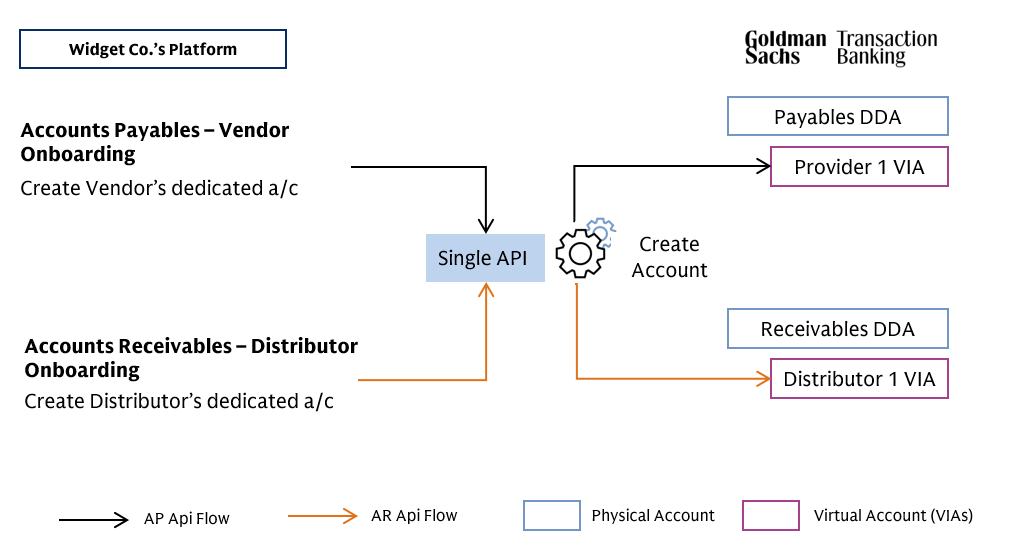
Creating Virtual Accounts via TxB APIs is a self-service process consisting of three actions. Please note that new Virtually Enabled DDAs may not be opened using this process.
Get List of Reserved Virtual Accounts
Widget Co. must first identify the pool of virtual account numbers that have been pre-allocated. This process allows for an immediately available virtual account number when a new provider or distributor is onboarded.
Request GET https://api.test.txb.gs.com/v2/accounts/reserved?branchCountry={{Account GS Branch}}
// Where {{Account GS Branch}} = Enum: "DE" "GB" "NL" "US" Response
{
    "reservedAccountNumbers": [
        {
            "accountNumber": "250000079648",
            "iban": null,
            "bankIdentifier": null,
            "externalPaymentIds": null
        },
        //...Full list of Reserved A/c’s Truncated
    ]
}
// Where "250000079648" is the reserved virtual account to be assigned to the new Provider
Create Virtual Account
Secondly, Widget Co. executes an Create Account API Post request for the new provider, "SA Cloud Services" using one of the reserved account numbers. This step transitions a pre-allocated virtual account number from the Reserved pool to an Active status, specifically assigned to the entity "SA Cloud Services".
Request POST https://api.test.txb.gs.com/v2/accounts/VIRTUAL
// Payload Body
{
    "virtualAccountRequest": {
        "requestId": "UniqueIdPerClientRequest",
        "administrative": {
            "accountName": "SA Cloud Services VIA USD",
            "accountNickname": "SA Cloud Services",
            "depositorType": "WHOLESALE",
            "accountPurposes": [
                "COMMERCIAL_PAYMENTS"
            ]
        },
        "accountIdentifiers": {
            "accountNumber": "250000079648"
        },
        "ownershipAndControl": {
            "thirdPartyIndicator": false
        },
        "typeSpecificInfo": {
            "virtualAccountInfo": {
                "parentAccountNumber": "240000171160"
            }
        }
    }
}
// Where "250000079648" is the reserved virtual account number retrieved in previous step
// Where “240000171160” is Widget Co.’s Payables Physical (DDA) Account
Response
200 OK
// empty response payload with the http status 200
Once a VIA is created and a 200 OK response is received, Widget Co. automatically links that specific virtual account number to the provider's internal record (e.g., "SA Cloud Services"). This ensures that all corresponding activity—including payments and returns — is attributed to the applicable provider, eliminating manual reconciliation. Widget Co. applies this same API-driven approach to its "Receivables DDA", using a unified set of tools to manage both incoming and outgoing cash flows while potentially minimizing administrative overhead.
Finalizing the Virtual Account Onboarding Workflow
To ensure the integrity of the automated onboarding process, Widget Co. performs a final validation sequence. This involves two distinct API operations:
- Verifying the completion of the account creation request, and
- Retrieving the full set of banking identifiers (such as the BIC and Virtual Account Number) required for global payment routing.
Verify virtual account creation
Request GET https://api.test.txb.gs.com/v2/accounts/requests/{{UniqueIdPerClientRequest}}?requestType=CREATE
// {{UniqueIdPerClientRequest}} is the requestId used in the above action of "Create account" API request.Response
{
    "accountId": "afd387aa-cc9c-40db-b349-1b6035bdfec6",
    "accountNumber": "250000079648",
    "error": null,
    "status": "COMPLETED"
}
Retrieve Account Details
Request POST https://api.test.txb.gs.com/v2/accounts/details
// Payload Body
{
    "accountNumber": "250000079648",
    "bankIdentifier": {
        "bic": "GSCRUS30"
    }
}
// TxB Bank BIC Code for Test: GSCRUS30 (for the US), GSLDGB20 (for the UK), ZYTADEF0 (for Germany), GOLDNL20 (for the Netherlands)
// Please remember to update the BIC code when moving flows to Production, it is common mistake to use these Test BICs
Response
{
    "type": "VIRTUAL",
    "accountStatus": "ACTIVE",
    "accountCurrency": "USD",
    "rate": null,
    "branchCountry": "US",
    "administrative": {
        "openDate": "2026-01-27T12:13:59.045Z",
        "accountName": "SA Cloud Services VIA USD",
        "accountNickname": "SA Cloud Services",
        "depositorType": "WHOLESALE",
        "accountPurposes": [
            "COMMERCIAL_PAYMENTS"
        ],
        "accountPurposeOtherDescription": null
    },
    "accountIdentifiers": {
        "accountNumber": "250000079648",
        "iban": null,
        "bankIdentifier": {
            "bic": "GSCRUS30VIA",
            "routingInfo": {
                "code": "USABA",
                "value": "026015079"
            },
            "bankName": null
        },
        "externalPaymentIds": []
    },
    //...Full response Truncated
}
Additional Information
- Get Reserved Accounts
- Create Virtual Account
- Query Virtual Account Creation Status
- Query Virtual Account Details
- Close Virtual Account
| 1: Connect | 2: Create Account | 3: Payout | 4: Payout Status | 5: Account Status | 6: Reconcile |
|---|
Was this page useful?
Give feedback to help us improve developer.gs.com and serve you better.