Integration via API - Step 3: Payout
Payment Processing Lifecycle
The Goldman Sachs Transaction Banking (TxB) platform utilizes a rail-agnostic TxB Originate Payment API that serves as a single entry point for all global disbursements. This architecture allows Widget Co. to execute payments across diverse networks – including ACH, Wires, Realtime Payments, or Check payments– using a consistent technical lifecycle.
The end-to-end payment process is divided into two primary phases: Payout Initiation (Step 3) and Payout Status (Step 4). The following diagram details the interaction model for these steps:
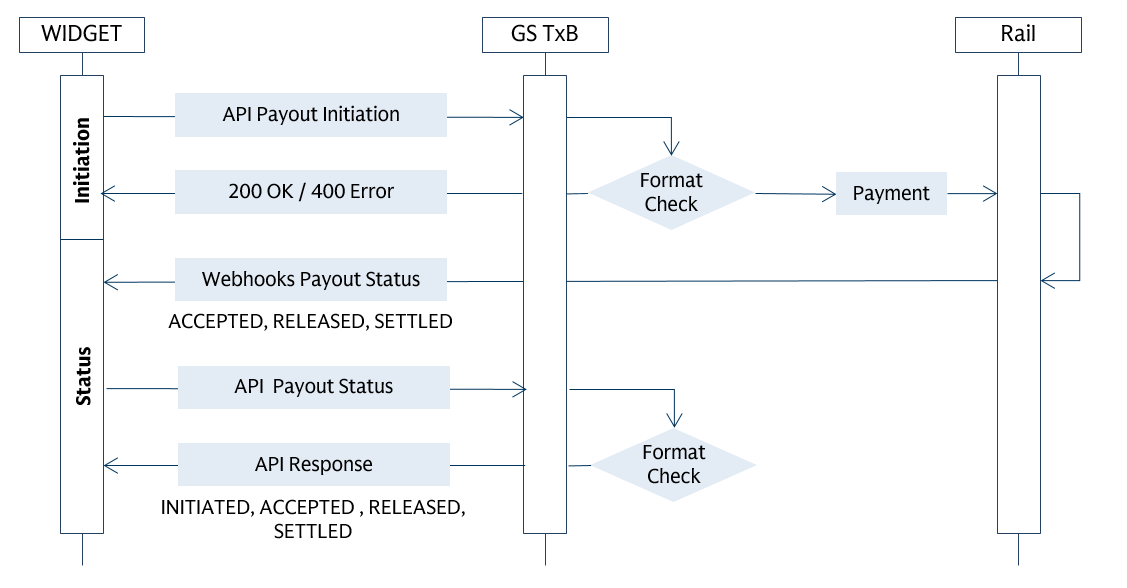
Widget Co. initiates payments by generating a payment request through the Originate Payment API. This API is common across all payment methods and account locations (e.g., United States, United Kingdom, Germany, and the Netherlands).
Please note that each payment request must use a single funding source. For these transactions, the designated funding source is the USD SA Cloud Services VIA, bearing virtual account number 250000079648. This virtual account was established by Widget Co. in step 2.
Payout Initiation
The Originate Payment API accommodates both single and batch payment operations. Users may opt to process an individual payment with each request or submit multiple payments within one batch request according to their specific needs. Each Originate Payment API request comprises two essential components:
requestLevel: This section encompasses information pertinent to all payments within the request. It includes the debtor virtual account details, selected payment rail, and other attributes that are consistent across every payment. Each payment request must include a mandatory single funding source and indicate the preferred payment rail.
The table below outlines the available payment rail options:
| paymentTypePreference { } | TxB Branch | Payment Rails |
|---|---|---|
| ACH | US UK DE | ACH, XB-ACH BACS, XB-ACH SEPA CT |
| WIRE | US UK DE NL | FedWire, SWIFT CHAPS, SWIFT SWIFT SWIFT |
| REALTIME | US UK DE | RTP FPS SEPA INST |
| CHECK | US | Check Print, Check Issue |
Note that checks also require usage of TxB’s Client Web Platform.
-
payouts: Structured as an array, this section provides beneficiary information for each individual payment specified in the request. Each array entry outlines the recipient and associated payment details. To minimize payment returns and rejections, it is important to include the following key attributes for each payment within the array:- Payment end to end Id –
paymentEndToEndId: "…"– Unique ID to track this payment - Payee information –
payeeAccount {…}– Who you want to pay: account details, payee name, account identifier, bank identifier, address - Payment currency and amount –
paymentCurrency: "…"andamount: "..." - Payment value date –
requestedPaymentDate: "..."– date on which you want TxB to release the payment. - Payment Purpose –
paymentPurpose "..."– description of payment or purpose code (as some rails or countries needs a purpose code) to be transmitted to beneficiary - Remittance Information –
remittanceInfo {…}– structured or unstructured details you want to send to payee (e.g., invoice number)
- Payment end to end Id –
Initiating a Batch Payment
Outgoing Batch or Low Value Payment Systems include US ACH, UK BACS and EU SEPA.
Widget Co.'s Accounts Payable team processed a payment using a single funding source via a batch payment containing two USACH transactions:
- Batch Payment Request ID PaymentReqID0000001 for a total amount of USD 406.00
- Payment #1 End_To_End ID TxE2EID000001 for USD 106.00
- Payment #2 End_To_End ID TxE2EID000002 for USD 300.00
For the batch payments, the account should reflect a single debit encompassing all transactions within the batch; in the current example, this equates to one debit of USD 406.00.
Here is the API call for the above payments:
Payment Request POST https://api.test.txb.gs.com/v2/payments/payouts
{
    "paymentRequestId": "PaymentReqID0000001",
    "requestLevel": {
        "fundingSource": {
            "fundingAccount": {
                "accountInfo": {
                    "accountHolderName": "Widget Co.",
                    "accountIdentifier": {
                        "accountNumber": "250000079648"
                    },
                    "bankIdentifier": {
                        "routingInfo": {
                            "code": "USABA",
                            "value": "026015079"
                        }
                    }
                }
            },
            "fundingCurrency": "USD"
        },
        "routingPreferences": {
            "paymentTypePreference": "ACH"
        }
    },
    "payouts": [
        {
            "paymentEndToEndId": "TxE2EID000001",
            "corePayoutInfo": {
                "payeeAccount": {
                    "accountInfo": {
                        "accountHolderName": "SA Cloud Services",
                        "accountIdentifier": {
                            "accountNumber": "110008974221"
                        },
                        "bankIdentifier": {
                            "routingInfo": {
                                "code": "USABA",
                                "value": "121000248"
                            }
                        }
                    }
                },
                "requestedPaymentDate": "2026-01-27",
                "paymentCurrency": "USD",
                "amount": 106,
                "messagesFromOriginator": {
                    "paymentPurpose": "Supplier payment",
                    "remittanceInfo": {
                        "unstructuredRemittance": [
                            "Invoice: IN1234005"
                        ]
                    }
                }
            }
        },
        {
            "paymentEndToEndId": "TxE2EID000002",
            "corePayoutInfo": {
                "payeeAccount": {
                    "accountInfo": {
                        "accountHolderName": "ABC Services",
                        "accountIdentifier": {
                            "accountNumber": "350018976339"
                        },
                        "bankIdentifier": {
                            "routingInfo": {
                                "code": "USABA",
                                "value": "021000021"
                            }
                        }
                    }
                },
                "requestedPaymentDate": "2026-01-27",
                "paymentCurrency": "USD",
                "amount": 300,
                "messagesFromOriginator": {
                    "paymentPurpose": "Supplier payment",
                    "remittanceInfo": {
                        "unstructuredRemittance": [
                            "Invoice: IN1234006"
                        ]
                    }
                }
            }
        }
    ]
}
Response
{
    "paymentRequestId": " PaymentReqID0000001",
    "collectionRequestId": null,
    "requestStatus": "ACCEPTED",
    "message": null
}
Initiating a Wire Payment
Outgoing wires and real-time payment systems comprise:
- Wires: US Fedwire, UK CHAPS, SWIFT International Wires
- Realtime Payments: US RTP, UK FPS, EU SEPA Inst
Widget Co.'s Accounts Payable team executed one payment instruction using a single funding source, which included two wire payments to two different accounts:
- Payment Request ID PaymentReqID0000002 with a total amount of USD 6012.00
- FedWire Payment #1 End_To_End ID TxE2EID000021 for USD 4012.00
- FedWire Payment #2 End_To_End ID TxE2EID000022 for USD 2000.00
The account should reflect a debit for each individual payment of this type; in the current example, this equates to two debit of USD 4012.0 and USD 2000.00
Here is the API call for the above payments:
Payment Request POST https://api.test.txb.gs.com/v2/payments/payouts
{
    "paymentRequestId": "PaymentReqID0000002",
    "requestLevel": {
        "fundingSource": {
            "fundingAccount": {
                "accountInfo": {
                    "accountHolderName": "Widget Co.",
                    "accountIdentifier": {
                        "accountNumber": "250000079648"
                    },
                    "bankIdentifier": {
                        "routingInfo": {
                            "code": "USABA",
                            "value": "026015079"
                        }
                    }
                }
            },
            "fundingCurrency": "USD"
        },
        "routingPreferences": {
            "paymentTypePreference": "WIRE" // for Real time payments use - REALTIME
        }
    },
    "payouts": [
        {
            "paymentEndToEndId": "TxE2EID000021",
            "corePayoutInfo": {
                "payeeAccount": {
                    "accountInfo": {
                        "accountHolderName": "SA Cloud Services",
                        "accountIdentifier": {
                            "accountNumber": "110008974221"
                        },
                        "bankIdentifier": {
                            "routingInfo": {
                                "code": "USABA",
                                "value": "121000248"
                            }
                        }
                    }
                },
                "requestedPaymentDate": "2026-01-27",
                "paymentCurrency": "USD",
                "amount": 4012,
                "messagesFromOriginator": {
                    "paymentPurpose": "Supplier payment",
                    "remittanceInfo": {
                        "unstructuredRemittance": [
                            "Invoice: IN1234001"
                        ]
                    }
                }
            }
        },
        {
            "paymentEndToEndId": "TxE2EID000022",
            "corePayoutInfo": {
                "payeeAccount": {
                    "accountInfo": {
                        "accountHolderName": "SA Cloud Services",
                        "accountIdentifier": {
                            "accountNumber": "350018976339"
                        },
                        "bankIdentifier": {
                            "routingInfo": {
                                "code": "USABA",
                                "value": "021000021"
                            }
                        }
                    }
                },
                "requestedPaymentDate": "2026-01-27",
                "paymentCurrency": "USD",
                "amount": 2000,
                "messagesFromOriginator": {
                    "paymentPurpose": "Supplier payment",
                    "remittanceInfo": {
                        "unstructuredRemittance": [
                            "Invoice: IN1234002"
                        ]
                    }
                }
            }
        }
    ]
}
Response
{
    "paymentRequestId": " PaymentReqID0000002",
    "collectionRequestId": null,
    "requestStatus": "ACCEPTED",
    "message": null
}
Once the payout request API has been initiated successfully, the next step is to verify the status of the payment.
Additional Information
- To obtain the most up-to-date API JSON Collection and environment variables, please contact TxB Product Solutions txb-product-solutions@gs.com
- Payment Initiation API Spec
| 1: Connect | 2: Create Account | 3: Payout | 4: Payout Status | 5: Account Status | 6: Reconcile |
|---|
Was this page useful?
Give feedback to help us improve developer.gs.com and serve you better.